miércoles, 5 de junio de 2024
No encontrar las librerías .h en linux
Las librerías que usa gcc y g++ (y creo que clang) están en /usr/include/ ...a veces el comando locate no encuentra las librerías.
viernes, 31 de mayo de 2024
Los 11 fallos más comunes en Lenguaje C
(1)Mezclar enteros signed y unsigned.
(2)Sobrepasando límites de un arreglo. (3)Perdiendo la condición base de una funcion recursiva. (4)Usando constantes de caracteres en vez de literales de cadena y viceversa. (5)Literales de tipo float son por defecto de tipo double. (6)Olvidando liberar la memoria. (7)Añadiendo un semicolon a #define. (8)No ser cuidadoso con el semicolon. (9)Erroneamente escribir = o ==. (10)Copiando demasiado. (11)Las macros son solo reeemplazo de cadenas. 1.- Mezclar enteros signed y unsigned en operaciones aritmeticas
2.- Sobrepasando los límites de un arreglo. Los arreglos siempre empiezan en 0 y terminan en la longitud del arreglo - 1.
3.- Perdiendo la condición base en una función recursiva. Calcular la factorización de un número es un ejemplo clásico de recursividad:
4.- Usando constantes de caracteres en vez de literales de cadena y viceversa. En lenguaje C, las cadenas de caracteres y literales de cadena son cosas distintas. 'a' ..esto es una cadena de caracter. Una cadena de caracter es de tipo entero que tiene asignado un número para ese caracter. "asdf"... es un literal de caracteres. Un literal de caracteres un arreglo inmodificable cuyos elementos son de tipo char. "asdf" tiene 5 caracteres, porque el caracter final es un \0. Este caracter final es conocido como carácter nulo. {a,s,d,f,\0}.
5.- Literales de tipo float son por defecto de tipo double. Hay que tener cuidado al inicializar una variable float a valores literales o compararlas con estos. Esto es debido a que literales float de valor 0.1 por lo regular son de tipo double. Este tipo de cosas nos puede conducir a sorpresas:
#include stdio.h
int main(){ float n = 0.1; if (n > 0.1) printf("Wierd\n");return 0;} // Prints "Wierd" when n is float
n fue inicializada y redondeada por precisión, resultando en 0.10000000149011612. Entonces, n es vuelto a
convertir en double para ser comparado con el valor literal 0.1 (lo cual es igual a 0.10000000000000001) lo que da una discordancia. Mezclar variables float con literales dobles puede resultar en pobre desempeño en plataformas donde no hay soporte de hardware para doble precisión.
6.- Olvidando liberar la memoria. Uno siempre debe recordar liberar la memoria alojada, sea una función hecha por tí o por una función de librería llamada por tu función.
7.- Añadiendo un semicolon a #define Muchas veces me pasó a mí!!! Es fácil confundirse con el preprocesador de C, y tratarlo como parte del lenguaje. Pero es un error, porque el preprocesador es sólo un mecanismo de reemplazo de texto.
10.- Copiando demasiado.
11.- Las Macros son solo reemplazo de cadenas
(2)Sobrepasando límites de un arreglo. (3)Perdiendo la condición base de una funcion recursiva. (4)Usando constantes de caracteres en vez de literales de cadena y viceversa. (5)Literales de tipo float son por defecto de tipo double. (6)Olvidando liberar la memoria. (7)Añadiendo un semicolon a #define. (8)No ser cuidadoso con el semicolon. (9)Erroneamente escribir = o ==. (10)Copiando demasiado. (11)Las macros son solo reeemplazo de cadenas. 1.- Mezclar enteros signed y unsigned en operaciones aritmeticas
#include stdio.h
int main(void){ unsigned int a = 1000;signed int b = -1; if (a > b) puts("a is more than b"); else puts("a is less or equal than b"); return 0;}
Como 1000 es mayor que -1 uno esperaría que a es mayor que b. Antes de hacer la comparación, b es convertida a
unsigned int. Cuando es convertido a unsigned int toma el valor máximo de unsigned int... el cual es mayor que 1000. Por esto se puede apreciar que a > b es una falso.
int main(void){ unsigned int a = 1000;signed int b = -1; if (a > b) puts("a is more than b"); else puts("a is less or equal than b"); return 0;}
2.- Sobrepasando los límites de un arreglo. Los arreglos siempre empiezan en 0 y terminan en la longitud del arreglo - 1.
#include stdio.h
int main(){ int x = 0;int myArray[5] = {1,2,3,4,5}; for(x=1; x<=5; x++){printf("%d\t",myArray[x]);} printf("\n");return 0;} //Output: 2 3 4 5 GarbageValue
La forma correcta:
int main(){ int x = 0;int myArray[5] = {1,2,3,4,5}; for(x=1; x<=5; x++){printf("%d\t",myArray[x]);} printf("\n");return 0;} //Output: 2 3 4 5 GarbageValue
#include stdio.h
int main(){ int x = 0;int myArray[5] = {1,2,3,4,5}; for(x=0; x<5; x++){printf("%d\t",myArray[x]);} printf("\n");return 0;} //Output: 1 2 3 4 5
Entonces, hay que conocer el límite de nuestros arreglos porque osino podemos corromper el buffer o provocar un fallo de segmentacion por acceder a un área de memoria distinta.
int main(){ int x = 0;int myArray[5] = {1,2,3,4,5}; for(x=0; x<5; x++){printf("%d\t",myArray[x]);} printf("\n");return 0;} //Output: 1 2 3 4 5
3.- Perdiendo la condición base en una función recursiva. Calcular la factorización de un número es un ejemplo clásico de recursividad:
#include stdio.h
int factorial(int n){return n * factorial(n - 1);}
int main(){ printf("Factorial %d = %d\n", 3, factorial(3));return 0;} //Typical output: Segmentation fault
El problema con esta función es que va a estar en un ciclo infinito, lo que causará fallo de segmentación. Necesita una condición base para detener la recursividad.
La forma correcta:
int factorial(int n){return n * factorial(n - 1);}
int main(){ printf("Factorial %d = %d\n", 3, factorial(3));return 0;} //Typical output: Segmentation fault
#include stdio.h
int factorial(int n){ // Base Condition, very crucial in designing the recursive functions.
if (n == 1){return 1;}else{return n * factorial(n - 1);}}
int main(){printf("Factorial %d = %d\n", 3, factorial(3));return 0;}
//Esta función va a terminar tan pronto alcance 1. //Output : Factorial 3 = 6
int factorial(int n){ // Base Condition, very crucial in designing the recursive functions.
if (n == 1){return 1;}else{return n * factorial(n - 1);}}
int main(){printf("Factorial %d = %d\n", 3, factorial(3));return 0;}
//Esta función va a terminar tan pronto alcance 1. //Output : Factorial 3 = 6
Reglas a seguir:
1 Iniciar el algoritmo. Las funciones recursivas necesitan con frecuencia un valor inicial con el que empezar. Esto es acompañado sea por un parametro de la función o una función puerta que no es recursiva pero pone los valores iniciales para la recursión.
2 Revisar para ver si los valores actuales que se están procesando coinciden con el caso base.Si es asi, entonces procesa y devuelve un valor
3 Redefine la respuesta en terminos de un problema pequeño o simple subproblema o subproblemas.
4 Ejecuta el algoritmo en un subproblema. 5 Combina los resultados en la formulación de la respuesta. 6 Retorna los resultados.
1 Iniciar el algoritmo. Las funciones recursivas necesitan con frecuencia un valor inicial con el que empezar. Esto es acompañado sea por un parametro de la función o una función puerta que no es recursiva pero pone los valores iniciales para la recursión.
2 Revisar para ver si los valores actuales que se están procesando coinciden con el caso base.Si es asi, entonces procesa y devuelve un valor
3 Redefine la respuesta en terminos de un problema pequeño o simple subproblema o subproblemas.
4 Ejecuta el algoritmo en un subproblema. 5 Combina los resultados en la formulación de la respuesta. 6 Retorna los resultados.
4.- Usando constantes de caracteres en vez de literales de cadena y viceversa. En lenguaje C, las cadenas de caracteres y literales de cadena son cosas distintas. 'a' ..esto es una cadena de caracter. Una cadena de caracter es de tipo entero que tiene asignado un número para ese caracter. "asdf"... es un literal de caracteres. Un literal de caracteres un arreglo inmodificable cuyos elementos son de tipo char. "asdf" tiene 5 caracteres, porque el caracter final es un \0. Este caracter final es conocido como carácter nulo. {a,s,d,f,\0}.
//ejemplo 1:
una cadena de caracteres es usada donde debería ir una literal de cadena. Esto da un comportamiento indefinido.
#include stdio.h
int main(void){ const char *hello = 'hello, world'; /* bad */puts(hello);return 0;}
//ejemplo 2: un literal de cadena se usa donde se debería usar una cadena de caracteres. El resultado es una cosa sin sentido.
#include stdio.h int main(void) { char c = "a"; /* bad */ printf("%c\n", c); return 0;}
En ambos casos el compilador se va a quejar de la mezcla. Si no pasa esto, necesita usar más advertencias para la compilación, o derechamente usar un mejor compilador.
#include stdio.h
int main(void){ const char *hello = 'hello, world'; /* bad */puts(hello);return 0;}
//ejemplo 2: un literal de cadena se usa donde se debería usar una cadena de caracteres. El resultado es una cosa sin sentido.
#include stdio.h int main(void) { char c = "a"; /* bad */ printf("%c\n", c); return 0;}
5.- Literales de tipo float son por defecto de tipo double. Hay que tener cuidado al inicializar una variable float a valores literales o compararlas con estos. Esto es debido a que literales float de valor 0.1 por lo regular son de tipo double. Este tipo de cosas nos puede conducir a sorpresas:
#include stdio.h
int main(){ float n = 0.1; if (n > 0.1) printf("Wierd\n");return 0;} // Prints "Wierd" when n is float
6.- Olvidando liberar la memoria. Uno siempre debe recordar liberar la memoria alojada, sea una función hecha por tí o por una función de librería llamada por tu función.
#include stdlib.h
#include stdio.h
int main(void){ char *line = NULL;size_t size = 0;
/* memory implicitly allocated in getline */ getline(&line, &size, stdin);
/* uncomment the line below to correct the code */ /* free(line); */return 0;}
Es un error inocente en este ejemplo específico,porque cuando un proceso termina,la mayoría de los sistemas operativos libera la memoria alojada en vez de tí.
int main(void){ char *line = NULL;size_t size = 0;
/* memory implicitly allocated in getline */ getline(&line, &size, stdin);
/* uncomment the line below to correct the code */ /* free(line); */return 0;}
7.- Añadiendo un semicolon a #define Muchas veces me pasó a mí!!! Es fácil confundirse con el preprocesador de C, y tratarlo como parte del lenguaje. Pero es un error, porque el preprocesador es sólo un mecanismo de reemplazo de texto.
// WRONG
#define MAX 100;
int arr[MAX]={0};
//lo cual se traduce como int arr[100]={0}; //Que se traduce como error de sintaxis.
8.- Ser cuidadoso con el semicolon
//lo cual se traduce como int arr[100]={0}; //Que se traduce como error de sintaxis.
//Esto:
if (x > a);
a = x;
//Significa esto: if (x > a) {} a = x;
Aveces, perder un semicolon puede provocar problemas inesperados:
//Significa esto: if (x > a) {} a = x;
if (i < 0)
return
day = date[0];
hour = date[1];
minute = date[2];
/*El semicolon antes de return está perdido, por lo que day =date[0]; va a ser regresado. El compilador lee hasta que encuentra ; como el fin de línea.*/
9.- Erroneamente escribir = en vez de ==.
El = es para asignar.
El == es para COMPARAR.
A veces hacemos: /* assign y to x */ if (x = y) {/* logic */}
//cuando lo que uno queria era: /* compare if x is equal to y */ if (x == y) {/* logic */}
//lo cual es equivalente a: /* compare if x is equal to y */ if (x == y) != 0{/* logic */}
A veces hacemos: /* assign y to x */ if (x = y) {/* logic */}
//cuando lo que uno queria era: /* compare if x is equal to y */ if (x == y) {/* logic */}
//lo cual es equivalente a: /* compare if x is equal to y */ if (x == y) != 0{/* logic */}
10.- Copiando demasiado.
char buf[8]={0}; /* tiny buffer, easy to overflow */
printf("What is your name?\n"); scanf("%s", buf); /* WRONG */ scanf("%7s", buf); /* RIGHT */
Si uno pone más caracteres que los requeridos por scanf, van a empezar a sobreescribirse zonas de memorias aledañas al buffer. Esto puede derivar en comportamiento indefinido. Los hackers maliciosos con frecuencia usan esto para sobreeescribir la dirección de return, y cambiar la dirección por la del código malicioso creado por este.
printf("What is your name?\n"); scanf("%s", buf); /* WRONG */ scanf("%7s", buf); /* RIGHT */
11.- Las Macros son solo reemplazo de cadenas
#include stdio.h
#define SQUARE(x) x*x
//este es el error. int main(void){printf("%d\n", SQUARE(1+2));return 0;}
Esperarías que este código devolviese 9, pero devolverá 5 porque la macro será expandida a 1+2*1+2. Para evadir este problema debe encerrar entre () las fichas para evadir este problema. #include stdio.h
#define SQUARE(x) ((x)*(x))
int main(void){printf("%d\n", SQUARE(1+2));return 0;}
//este es el error. int main(void){printf("%d\n", SQUARE(1+2));return 0;}
Esperarías que este código devolviese 9, pero devolverá 5 porque la macro será expandida a 1+2*1+2. Para evadir este problema debe encerrar entre () las fichas para evadir este problema. #include stdio.h
#define SQUARE(x) ((x)*(x))
int main(void){printf("%d\n", SQUARE(1+2));return 0;}
TextView and EditText en Android
crear un archivo .xml con esto:
LinearLayout xmlns:android="http://schemas.android.com/apk/res/android"
xmlns:app="http://schemas.android.com/apk/res-auto"
xmlns:tools="http://schemas.android.com/tools"
android:layout_width="match_parent"
android:layout_height="match_parent">
Diferencias entre const int y int const
Una respuesta simple: leer hacia atrás.
Los punteros como sabréis son variables especiales que apuntan a otras variables, y las constantes son variables que no cambian durante la ejecución de un programa.
int * ptr = ptr es un puntero hacia int.
int const * ptr = ptr es un puntero hacia constante int.
int * const ptr = ptr es un puntero constante hacia int.
const int * const ptr = ptr es una constante puntero a una constante int.
const int * ptr es igual a int const * ptr
const int * const ptr es igual a int const * const ptr
véase que lo que cambia es lo que esta antes de *ptr o *const ptr.
int ** ptr = is a pointer to pointer(p2p) to int. Un puntero que apunta hacia otro puntero.
int ** const ptr = ptr es un puntero constante de un puntero hacia int.
int * const * ptr = ptr es un puntero a una constante puntero hacia int.
int const **ptr = ptr es un puntero de un puntero hacia una constante int.
int * const * const ptr = ptr es un puntero constante de otro puntero constante hacia int.
¿Como saber si const se refiere al puntero o lo apuntado? Si está del lado derecho del asterico, entonces se refiere a lo apuntado. Si está del lado izquierdo del asterico, del puntero.
Fuente: What is the difference between const int and int const.
miércoles, 22 de mayo de 2024
Colores c.nanorc
## Syntax highlighting for C and C++ files.
syntax c "\.([ch](pp|xx)?|C|cc|c\+\+|cu|H|hh|ii?)$"
header "-\*-.*\" # Labels. color brightmagenta "^[[:blank:]]*[A-Z_a-z][0-9A-Z_a-z]*:[[:blank:]]*$"
color normal ":[[:blank:]]*$" # Types and related keywords. color green "\<(auto|bool|char|const|double|enum|extern|float|inline|int|long|restrict|short|signed|sizeof|static|struct|typedef|union|unsigned|void)\>"
color green "\<([[:lower:]][[:lower:]_]*|(u_?)?int(8|16|32|64))_t\>" color green "\<(_(Alignas|Alignof|Atomic|Bool|Complex|Generic|Imaginary|Noreturn|Static_assert|Thread_local))\>" color green "\<(class|explicit|friend|mutable|namespace|override|private|protected|public|register|template|this|typename|using|virtual|volatile)\>" # Flow control. color brightyellow "\<(if|else|for|while|do|switch|case|default)\>" color brightyellow "\<(try|throw|catch|operator|new|delete)\>" color magenta "\<(break|continue|goto|return)\>" # Single-quoted stuff (characters, backslash escapes, hex and octal byte codes). color brightmagenta "'([^'\]|\\(["'\abfnrtv]|x[[:xdigit:]]{1,2}|[0-3]?[0-7]{1,2}))'" # GCC builtins. color cyan "__attribute__[[:blank:]]*\(\([^)]*\)\)|__(aligned|asm|builtin|hidden|inline|packed|restrict|section|typeof|weak)__" # Strings and names of included files. color brightyellow ""([^"]|\\")*"|#[[:blank:]]*include[[:blank:]]*<[^>]+>" # Preprocessor directives. color brightcyan start="^[[:blank:]]*#[[:blank:]]*(if(n?def)?|elif|warning|error|pragma)\>" end="(\`|[^\])$" color brightcyan "^[[:blank:]]*#[[:blank:]]*((define|else|endif|include(_next)?|line|undef)\>|$)" # Comments. color brightblue "//.*" color brightblue start="/\*" end="\*/" # Reminders. color brightwhite,yellow "\<(FIXME|TODO|XXX)\>" # Trailing whitespace. color ,green "[[:space:]]+$"
viernes, 12 de abril de 2024
ELF Basics Internal: Elf Basics.
/*Este material no lo hice yo. Source: oxhat.blogspot.com*/
In this post I will share details on ELF binary basics.
, ( in case we get error we can install gcc multilib by issuing command sudo apt-get install gcc-multilib ) If we issue file command on the binary we created we would see the following output
pentest@ubuntu:~/Desktop$ file hello64 hello64: ELF 64-bit LSB shared object, x86-64, version 1 (SYSV), dynamically linked, interpreter /lib64/ld-linux-x86-64.so.2, for GNU/Linux 3.2.0, BuildID[sha1]=797fa6ea8a92b773eb5106c822a76788441ceac1, not stripped
pentest@ubuntu:~/Desktop$ file hello32 hello32: ELF 32-bit LSB shared object, Intel 80386, version 1 (SYSV), dynamically linked, interpreter /lib/ld-linux.so.2, for GNU/Linux 3.2.0, BuildID[sha1]=ba188ad09ee9ff9ac774833b8a7c87d8afbc443a, not stripped
So let us try to understand what all these mean (we will analyze the result of 64 bit binary)
hello64: This is the filename of the binary on which we are executing the file command
ELF - Executable and Linking Format or Executable and Linkable Format - This mean that the binary type is associated with mainly UNIX type operating system , like Linux, Solaris but also supports certain non UNIX operating system.
64bit - This gives us information tells about the architecture of the binary that it is 64 bit. So if it is a 32 bit binary it will be shown as 32 If we are in a 64bit machine and if we want to create a 32 bit binary we can pass the -m32 option
LSB - Least Significant Byte - It means the binary is in little endian format. In Intel architecture you will often find this as LSB. However in architectures like PowerPC , SPARC and so on it is possible to get this in big endian format i.e MSB ( Most Significant Byte )
Shared object - This result can either be Shared Object or Relocatable or Executable.
Let us see how these are different from each other and how we can generate them using gcc. The two terms which we are going to use here are PIC ( Position Independent Code ) and PIE ( Position Independent Executable) .
When we are planning to create a library that can be called by many process, we need to make it a PIC so that they can be loaded in the memory at any virtual address and just because they are position independent it can be accessed with relative offsets without worrying about the clashes of fixed locations in memory. We can create a PIE when Shared Object - By default the gcc compiler compiles the source code with -fPIC which makes address of the sections in the program relative to each other.
Executable - This mean this is not a PIE application. This loads with absolute address and thus we can find no reference of .plt.got sections here as the program is loaded in memory with fixed address .We can disable PIE with -no-pie option in gcc and thus we will get a executable object file.
Relocatable - This means this is just an object code without any linking of libraries or files that are necessary for the execution.
There are some steps involved when we make a program that can be executable ( Please Note: The term executable here means here is to make it run or execute and should not be confused with the above executable object type ).
To make an executable from source program the following process is involved.
Normally in gcc we do in one step like gcc hello.c -o hello.out
but however we can do in 2 steps like gcc -c hello.c ; this will create an object file called hello.o This is how the disassembly of main looks like in object code.
This program cannot run or do anything because the object code doesn't have the necessary linked objects or libraries required for execution. We can generate an executable binary from object code using the command
gcc hello.o -o hello-executable Now if we run objdump on the binary we can see lots of sections getting created with the location to the linkers.
This is how the disassembly of main looks like after linking
Dynamically linked, interpreter /lib/ld-linux.so.2, - It means that the binary uses some dynamically linked libraries. There is 2 possible values possible for this.Dynamically linked and Statically Linked.
Dynamically Linked - It means the linker actually uses a reference to load dynamically linked libraries in memory during execution of the program from the location /lib/ld-linux.so.2
We can verify it by running the ldd on the binary
So let is begin with a very simple hello world program in C
#include stdio.h
int main(){printf("\nHello World\n");return 0;}
As I am on a 64 bit Linux system I will compile the binary for both 32bit and 64bit mode.
We will compile this code with gcc by issuing the command
for 64 bit -> gcc hello.c -o hello64
for 32 bit -> gcc hello.c -m32 -o hello32
for 32 bit -> gcc hello.c -m32 -o hello32
, ( in case we get error we can install gcc multilib by issuing command sudo apt-get install gcc-multilib ) If we issue file command on the binary we created we would see the following output
pentest@ubuntu:~/Desktop$ file hello64 hello64: ELF 64-bit LSB shared object, x86-64, version 1 (SYSV), dynamically linked, interpreter /lib64/ld-linux-x86-64.so.2, for GNU/Linux 3.2.0, BuildID[sha1]=797fa6ea8a92b773eb5106c822a76788441ceac1, not stripped
pentest@ubuntu:~/Desktop$ file hello32 hello32: ELF 32-bit LSB shared object, Intel 80386, version 1 (SYSV), dynamically linked, interpreter /lib/ld-linux.so.2, for GNU/Linux 3.2.0, BuildID[sha1]=ba188ad09ee9ff9ac774833b8a7c87d8afbc443a, not stripped
So let us try to understand what all these mean (we will analyze the result of 64 bit binary)
hello64: ELF 64-bit LSB shared object, x86-64, version 1 (SYSV), dynamically linked, interpreter /lib64/ld-linux-x86-64.so.2, for GNU/Linux 3.2.0, BuildID[sha1]=797fa6ea8a92b773eb5106c822a76788441ceac1, not stripped
hello64: This is the filename of the binary on which we are executing the file command
ELF - Executable and Linking Format or Executable and Linkable Format - This mean that the binary type is associated with mainly UNIX type operating system , like Linux, Solaris but also supports certain non UNIX operating system.
64bit - This gives us information tells about the architecture of the binary that it is 64 bit. So if it is a 32 bit binary it will be shown as 32 If we are in a 64bit machine and if we want to create a 32 bit binary we can pass the -m32 option
LSB - Least Significant Byte - It means the binary is in little endian format. In Intel architecture you will often find this as LSB. However in architectures like PowerPC , SPARC and so on it is possible to get this in big endian format i.e MSB ( Most Significant Byte )
Shared object - This result can either be Shared Object or Relocatable or Executable.
Let us see how these are different from each other and how we can generate them using gcc. The two terms which we are going to use here are PIC ( Position Independent Code ) and PIE ( Position Independent Executable) .
When we are planning to create a library that can be called by many process, we need to make it a PIC so that they can be loaded in the memory at any virtual address and just because they are position independent it can be accessed with relative offsets without worrying about the clashes of fixed locations in memory. We can create a PIE when Shared Object - By default the gcc compiler compiles the source code with -fPIC which makes address of the sections in the program relative to each other.
Executable - This mean this is not a PIE application. This loads with absolute address and thus we can find no reference of .plt.got sections here as the program is loaded in memory with fixed address .We can disable PIE with -no-pie option in gcc and thus we will get a executable object file.
Relocatable - This means this is just an object code without any linking of libraries or files that are necessary for the execution.
There are some steps involved when we make a program that can be executable ( Please Note: The term executable here means here is to make it run or execute and should not be confused with the above executable object type ).
To make an executable from source program the following process is involved.
Preprocessing -> Compilation -> Object File Creation -> Linking.
Normally in gcc we do in one step like gcc hello.c -o hello.out
but however we can do in 2 steps like gcc -c hello.c ; this will create an object file called hello.o This is how the disassembly of main looks like in object code.
0000000000000000 <main>:
0: 55 push rbp
1: 48 89 e5 mov rbp,rsp
4: 48 8d 3d 00 00 00 00 lea rdi,[rip+0x0] # b <main+0xb>
b: e8 00 00 00 00 call 10 <main+0x10>
10: 90 nop
11: 5d pop rbp
12: c3 ret
0: 55 push rbp
1: 48 89 e5 mov rbp,rsp
4: 48 8d 3d 00 00 00 00 lea rdi,[rip+0x0] # b <main+0xb>
b: e8 00 00 00 00 call 10 <main+0x10>
10: 90 nop
11: 5d pop rbp
12: c3 ret
This program cannot run or do anything because the object code doesn't have the necessary linked objects or libraries required for execution. We can generate an executable binary from object code using the command
gcc hello.o -o hello-executable Now if we run objdump on the binary we can see lots of sections getting created with the location to the linkers.
This is how the disassembly of main looks like after linking
000000000000063a <main>:
63a: 55 push rbp
63b: 48 89 e5 mov rbp,rsp
63e: 48 8d 3d 8f 00 00 00 lea rdi,[rip+0x8f] # 6d4
<_IO_stdin_used+0x4>
645: e8 c6 fe ff ff call 510
<puts@plt>
64a: 90 nop
64b: 5d pop rbp
64c: c3 ret
64d: 0f 1f 00 nop DWORD PTR [rax]
Nota: Lo marcado con fondo rojo va al final de la línea anterior.
version 1 (SYSV) - This means that it uses version 1 and the target operating system for the binary is SYSTEM V. There can be other possible values for this for example FreeBSD, HP-UX , etc,. I didn't get enough resource from where I can find more details on the version 1 result and how it can affect something.
63a: 55 push rbp
63b: 48 89 e5 mov rbp,rsp
63e: 48 8d 3d 8f 00 00 00 lea rdi,[rip+0x8f] # 6d4
<_IO_stdin_used+0x4>
645: e8 c6 fe ff ff call 510
<puts@plt>
64a: 90 nop
64b: 5d pop rbp
64c: c3 ret
64d: 0f 1f 00 nop DWORD PTR [rax]
Dynamically linked, interpreter /lib/ld-linux.so.2, - It means that the binary uses some dynamically linked libraries. There is 2 possible values possible for this.Dynamically linked and Statically Linked.
Dynamically Linked - It means the linker actually uses a reference to load dynamically linked libraries in memory during execution of the program from the location /lib/ld-linux.so.2
We can verify it by running the ldd on the binary
pentest@ubuntu:~/Desktop$ ldd hello64
linux-vdso.so.1 (0x00007fff96bc2000)
libc.so.6 => /lib/x86_64-linux-gnu/libc.so.6 (0x00007f425eb2a000)
/lib64/ld-linux-x86-64.so.2 (0x00007f425f11d000)
Statically Linked - It means that the binary has been packed along with the libraries. So there is no dynamically linked libraries inside it. So if a binary is compiled with -shared option in gcc it will create a statically linked binary. So if we run ldd command on the binary it will tell that there is not a dynamic executable.
pentest@ubuntu:~/Desktop$ ldd helloStatic
not a dynamic executable
There is a huge difference in sizes of the binary when compiled with -shared option ( i.e statically )
-rwxrwxr-x 1 pentest pentest 8296 Feb 6 08:55 hello64
-rwxrwxr-x 1 pentest pentest 844704 Feb 7 09:28 helloStatic
At this point you might feel confused between the relocation of the binary that we discussed before and the linking which we are discussing now. Well when we talk about shared object or executable or relocatable object type, then we are actually dealing how the program will be loaded in memory but when we talk about linking, then it is all about how the external libraries will be linked to binaries - either dynamically via some shared resources or statically by packing it with the actual binary.
So we can make this statement , an executable object type may have dynamic linked libraries. Than means even if we disable PIE we can still get an executable with dynamically linked libraries.
pentest@ubuntu:~/Desktop$ file helloNOPIE
helloNOPIE: ELF 64-bit LSB executable, x86-64, version 1 (SYSV), dynamically linked, interpreter /lib64/ld-linux-x86-64.so.2, for GNU/Linux 3.2.0, BuildID[sha1]=2d986bca273f541af7a48ffb51f4d5fd22177c22, not stripped
pentest@ubuntu:~/Desktop$ ldd helloNOPIE linux-vdso.so.1 (0x00007ffffe990000) libc.so.6 => /lib/x86_64-linux-gnu/libc.so.6 (0x00007fcb5e8c0000) /lib64/ld-linux-x86-64.so.2 (0x00007fcb5ecb1000)
for GNU/Linux 3.2.0 - The minimum kernel version required to execute the binary
BuildID[sha1]=ba188ad09ee9ff9ac774833b8a7c87d8afbc443a - This ID is assigned to the binary during the build phase. Possibly during the linking phase as this is not visible in object code after compilation.
not stripped - This means that the certain but not all debugging information are available. It can also have a value stripped in case we remove the debug symbols. A stripped binary is smaller in size than an not stripped binary. When we strip a binary we remove some extra sections from a binary that is not relevant or required for execution but was added for making debugging easy.
We can verify using gdb and we can keep debug symbols in a binary by compiling with -g option
pentest@ubuntu:~/Desktop$ ldd helloNOPIE linux-vdso.so.1 (0x00007ffffe990000) libc.so.6 => /lib/x86_64-linux-gnu/libc.so.6 (0x00007fcb5e8c0000) /lib64/ld-linux-x86-64.so.2 (0x00007fcb5ecb1000)
pentest@ubuntu:~/Desktop$ gcc hello.c -g -o helloDebugSymbols
pentest@ubuntu:~/Desktop$ gdb -q ./helloDebugSymbols
Reading symbols from ./helloDebugSymbols...done.
(gdb) info functions
All defined functions:
File hello.c:
void main();
Non-debugging symbols:
0x00000000000004e8 _init
0x0000000000000510 puts@plt
0x0000000000000520 __cxa_finalize@plt
0x0000000000000530 _start
0x0000000000000560 deregister_tm_clones
0x00000000000005a0 register_tm_clones
0x00000000000005f0 __do_global_dtors_aux
0x0000000000000630 frame_dummy
0x0000000000000650 __libc_csu_init
0x00000000000006c0 __libc_csu_fini
0x00000000000006c4 _fini
Now we will try the same with Stripped Binary and we can see that as there there is no debug symbols there is no reference to the function void main() as per source code. However there are still certain debug information available. For example I can find the address of main function.
pentest@ubuntu:~/Desktop$ gcc hello.c -o helloNoDebugSymbols
pentest@ubuntu:~/Desktop$ gdb -q ./helloNoDebugSymbols
Reading symbols from ./helloNoDebugSymbols...(no debugging symbols found)...done.
(gdb) info functions
All defined functions:
Non-debugging symbols:
0x00000000000004e8 _init
0x0000000000000510 puts@plt
0x0000000000000520 __cxa_finalize@plt
0x0000000000000530 _start
0x0000000000000560 deregister_tm_clones
0x00000000000005a0 register_tm_clones
0x00000000000005f0 __do_global_dtors_aux
0x0000000000000630 frame_dummy
0x000000000000063a main
0x0000000000000650 __libc_csu_init
0x00000000000006c0 __libc_csu_fini
0x00000000000006c4 _fini
We can strip it down further using strip function
pentest@ubuntu:~/Desktop$ strip -s helloNoDebugSymbols -o helloNoDebugSymbolsStripped
pentest@ubuntu:~/Desktop$ gdb -q ./helloNoDebugSymbolsStripped
Reading symbols from ./helloNoDebugSymbolsStripped...(no debugging symbols found)...done.
(gdb) info functions
All defined functions:
Non-debugging symbols:
0x0000000000000510 puts@plt
0x0000000000000520 __cxa_finalize@plt
So that's all for this blog post. In my further posts I will talk in more details about each of the part of elf binary in more details
shellcode a ASM y al reves
/*Este manual no es de mi autoría. Salió de https://oxhat.blogspot.com*/
As i have started a journey into vulnerability research and exploitation, i thought of sharing some topics which I found very confusing initially. So i will try to detail as much information as possible.
So we will begin by writing a simple helloworld assembly code. The code will do the following
Print HelloWorld
and Exit
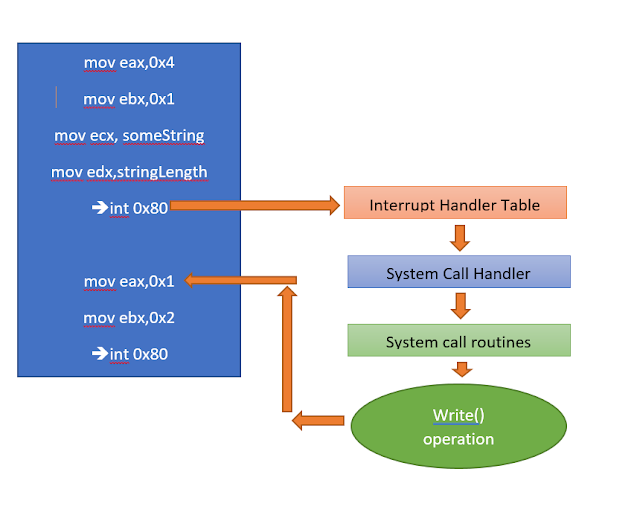
Now you may wonder why do I have to write a code that exits ? If such is the case then you might probably have written good amount of code in high level language. The compilers of high level languages takes care of it i.e writing the extra code in the object file like the exit code. Internally every operations like read , write , exit and so on requires some low level calls to kernel. These calls are called SysCalls. So if you are programming using high level language like C and C++ , then you don't need to write codes to make the syscalls because due to the abstraction layer that hides the excessive code that is required to code. The compiler takes care to generate the object code which has essential exit code in it. To trigger these syscalls we need to use interrupt. Now these interrupt is maintained using an interrupt table. The diagram below shows the workflow of the syscalls and the interrupt
 Now that i have given you a brief idea on why we need to write an exit code in asm, we will program a helloworld code
global _start
section .text
_start:
;/usr/include/i386-linux-gnu/asm/unistd_32.h
;#ifndef _ASM_X86_UNISTD_32_H
;#define _ASM_X86_UNISTD_32_H 1
;#define __NR_restart_syscall 0
;#define __NR_exit 1
;#define __NR_fork 2
;#define __NR_read 3
;#define __NR_write 4
;#define __NR_open 5
;#define __NR_close 6
;ssize_t write(int fd, const void *buf, size_t count);
mov eax,0x4 ; syscall for write => 4
mov ebx,0x1 ; fd => stdout
mov ecx,someString ; *buf => someString
mov edx,strlen ; size_t count => strlen
int 0x80 ; call interrupt
;void exit(int status);
mov eax,0x1 ; syscall for exit => 1
mov ebx,0x2 ; status => 2
int 0x80 ; call innterupt
section .data
someString: db "Hello World NASM"
strlen equ $-someString
Now that i have given you a brief idea on why we need to write an exit code in asm, we will program a helloworld code
global _start
section .text
_start:
;/usr/include/i386-linux-gnu/asm/unistd_32.h
;#ifndef _ASM_X86_UNISTD_32_H
;#define _ASM_X86_UNISTD_32_H 1
;#define __NR_restart_syscall 0
;#define __NR_exit 1
;#define __NR_fork 2
;#define __NR_read 3
;#define __NR_write 4
;#define __NR_open 5
;#define __NR_close 6
;ssize_t write(int fd, const void *buf, size_t count);
mov eax,0x4 ; syscall for write => 4
mov ebx,0x1 ; fd => stdout
mov ecx,someString ; *buf => someString
mov edx,strlen ; size_t count => strlen
int 0x80 ; call interrupt
;void exit(int status);
mov eax,0x1 ; syscall for exit => 1
mov ebx,0x2 ; status => 2
int 0x80 ; call innterupt
section .data
someString: db "Hello World NASM"
strlen equ $-someString
 Now that I have a working , elf binary , my next target is to generate the shellcode from it.
I will use the objdump utility to view the disassembled contents of the binary along with the opcodes.
Now that I have a working , elf binary , my next target is to generate the shellcode from it.
I will use the objdump utility to view the disassembled contents of the binary along with the opcodes.
 There is a nice one liner at ( http://www.commandlinefu.com/commands/view/6051/get-all-shellcode-on-binary-file-from-objdump ) which we can use to get the shellcode from the binary.
objdump -d ./PROGRAM|grep '[0-9a-f]:'|grep -v 'file'|cut -f2 -d:|cut -f1-6 -d' '|tr -s ' '|tr '\t' ' '|sed 's/ $//g'|sed 's/ /\\x/g'|paste -d '' -s |sed 's/^/"/'|sed 's/$/"/g'
Using this technique, we can get a nice shell code from it which we dont need to extract manually from the disassembled code
objdump -d ./helloworld|grep '[0-9a-f]:'|grep -v 'file'|cut -f2 -d:|cut -f1-6 -d' '|tr -s ' '|tr '\t' ' '|sed 's/ $//g'|sed 's/ /\\x/g'|paste -d '' -s |sed 's/^/"/'|sed 's/$/"/g'
"\xb8\x04\x00\x00\x00\xbb\x01\x00\x00\x00\xb9\xa4\x90\x04\x08\xba\x10\x00\x00\x00\xcd\x80\xb8\x01\x00\x00\x00\xbb\x02\x00\x00\x00\xcd\x80"
Sweet! Now our 1st part of the tutorial is over , moving to the next , ShellCode to Assembly.
Now if I present you with the following shellcode, how will you get back to a working elf executable.
"\xb8\x04\x00\x00\x00\xbb\x01\x00\x00\x00\xb9\xa4\x90\x04\x08\xba\x10\x00\x00\x00\xcd\x80\xb8\x01\x00\x00\x00\xbb\x02\x00\x00\x00\xcd\x80"'
Lets copy the shellcode and save the contents inside a file. Please note we are going to save the shellcode as raw hex file and not as text. To do it we need help of perl
Syntax : perl -e 'print "YOUR SHELL CODE"' > outputFile
perl -e 'print "\xb8\x04\x00\x00\x00\xbb\x01\x00\x00\x00\xb9\xa4\x90\x04\x08\xba\x10\x00\x00\x00\xcd\x80\xb8\x01\x00\x00\x00\xbb\x02\x00\x00\x00\xcd\x80"' > hexraw
Now we will use the ndisasm utility to get the disassembled code from the file. So what ndisasm is doing here is converting the hex opcodes into equivalent asm instructions.
Syntax : ndisasm -b 32 hexraw
There is a nice one liner at ( http://www.commandlinefu.com/commands/view/6051/get-all-shellcode-on-binary-file-from-objdump ) which we can use to get the shellcode from the binary.
objdump -d ./PROGRAM|grep '[0-9a-f]:'|grep -v 'file'|cut -f2 -d:|cut -f1-6 -d' '|tr -s ' '|tr '\t' ' '|sed 's/ $//g'|sed 's/ /\\x/g'|paste -d '' -s |sed 's/^/"/'|sed 's/$/"/g'
Using this technique, we can get a nice shell code from it which we dont need to extract manually from the disassembled code
objdump -d ./helloworld|grep '[0-9a-f]:'|grep -v 'file'|cut -f2 -d:|cut -f1-6 -d' '|tr -s ' '|tr '\t' ' '|sed 's/ $//g'|sed 's/ /\\x/g'|paste -d '' -s |sed 's/^/"/'|sed 's/$/"/g'
"\xb8\x04\x00\x00\x00\xbb\x01\x00\x00\x00\xb9\xa4\x90\x04\x08\xba\x10\x00\x00\x00\xcd\x80\xb8\x01\x00\x00\x00\xbb\x02\x00\x00\x00\xcd\x80"
Sweet! Now our 1st part of the tutorial is over , moving to the next , ShellCode to Assembly.
Now if I present you with the following shellcode, how will you get back to a working elf executable.
"\xb8\x04\x00\x00\x00\xbb\x01\x00\x00\x00\xb9\xa4\x90\x04\x08\xba\x10\x00\x00\x00\xcd\x80\xb8\x01\x00\x00\x00\xbb\x02\x00\x00\x00\xcd\x80"'
Lets copy the shellcode and save the contents inside a file. Please note we are going to save the shellcode as raw hex file and not as text. To do it we need help of perl
Syntax : perl -e 'print "YOUR SHELL CODE"' > outputFile
perl -e 'print "\xb8\x04\x00\x00\x00\xbb\x01\x00\x00\x00\xb9\xa4\x90\x04\x08\xba\x10\x00\x00\x00\xcd\x80\xb8\x01\x00\x00\x00\xbb\x02\x00\x00\x00\xcd\x80"' > hexraw
Now we will use the ndisasm utility to get the disassembled code from the file. So what ndisasm is doing here is converting the hex opcodes into equivalent asm instructions.
Syntax : ndisasm -b 32 hexraw
 Now you can see , we almost have the same code that we wrote, except there is an hardcoded address 0x80490a4 at line 3 and hardcoded value at line 4. The problem is we got the disassembled code of the .text section and not the .data section. Let us fix the code by modifying the code a little.
global _start
section .text
_start:
mov eax,0x4
mov ebx,0x1
mov ecx,someString
mov edx,strlen
int 0x80
mov eax,0x1
mov ebx,0x2
int 0x80
section .data
someString: db "Hello World ASM"
strlen equ $-someString
Finally we are able to get back our ASM code and make it execute successfully
Now you can see , we almost have the same code that we wrote, except there is an hardcoded address 0x80490a4 at line 3 and hardcoded value at line 4. The problem is we got the disassembled code of the .text section and not the .data section. Let us fix the code by modifying the code a little.
global _start
section .text
_start:
mov eax,0x4
mov ebx,0x1
mov ecx,someString
mov edx,strlen
int 0x80
mov eax,0x1
mov ebx,0x2
int 0x80
section .data
someString: db "Hello World ASM"
strlen equ $-someString
Finally we are able to get back our ASM code and make it execute successfully



Suscribirse a:
Entradas (Atom)